We were expecting a traffic spike during a scheduled peak window. The system ran on a managed container platform with automatic horizontal scaling enabled. PostgreSQL on RDS. Standard setup, nothing exotic.
What we didn't account for was what horizontal scaling does to database connections.
The Problem
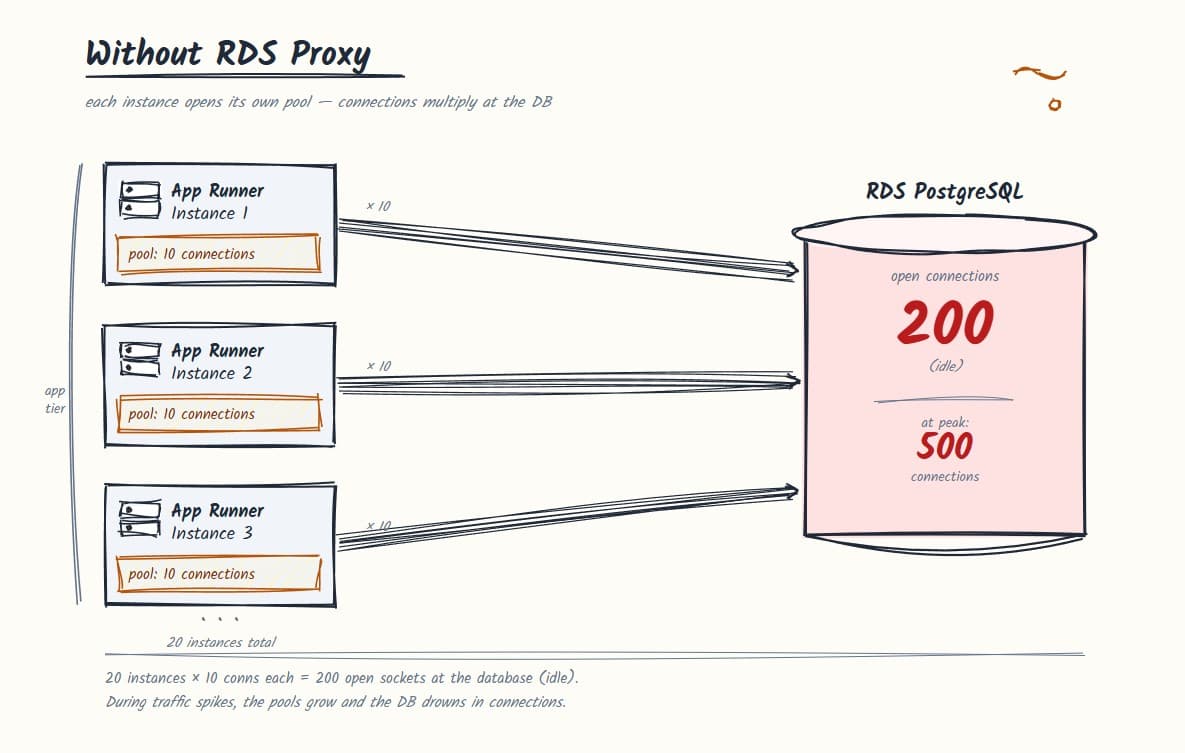
The compute layer scaled by spinning up additional container instances as traffic increased. Each instance ran its own NestJS process. Each NestJS process initialized its own TypeORM connection pool.
The default TypeORM pool size with the pg driver is 10 connections per instance.
- At 3 instances: 30 connections to RDS.
- At 20 instances: 200 connections to RDS.
PostgreSQL doesn't handle connections with threads. It forks a new OS process for every connection. The postmaster process spawns a dedicated backend process each time a client connects. Each of those processes carries its own memory overhead, somewhere between 5-10MB depending on workload and configuration. At 200 open connections, you have 200 forked backend processes sitting on your RDS instance. Most of them are idle, holding a slot, consuming memory.
This is why max_connections is a hard limit with real consequences. When you hit it, you're out of memory and process slots on the database host. New connection attempts fail. Requests back up, response times tank, and the queries themselves are fine. There's just nowhere to run them.
A t3.small RDS instance has a max_connections limit of roughly 200. At peak, with 20 instances all holding open pools, we'd already blown past it.
This became visible during load testing. Latency started climbing while query execution stayed healthy. The bottleneck wasn't the queries. It was the connection count.
Why This Catches People Off Guard
Connection pooling at the application level solves a different problem than connection pooling at the infrastructure level.
TypeORM's built-in pool manages connections within a single long-running process. It reuses connections across concurrent requests inside that process, which is useful. But each process has its own pool, and each pool holds its connections open independently.
When you're running one server, this is fine. When you're running 20 instances, you have 20 independent pools all talking to the same RDS instance simultaneously. The pool isn't shared across processes. There's no coordination. RDS just sees 200 open connections and has no idea which ones are actually in use.
The instinct is usually to tune the pool size down per instance. That helps, but it doesn't fix the underlying model. You're still multiplying per-instance pool size by instance count. The problem scales with your instance count, not your actual database load.
| Setup | Instances | Pool per Instance | Total Connections |
|---|---|---|---|
| Light traffic | 3 | 10 | 30 |
| Moderate traffic | 10 | 10 | 100 |
| Peak traffic | 20 | 10 | 200 |
| Peak, pool tuned to 2 | 20 | 2 | 50 |
| With RDS Proxy (any) | 20 | 2 | ~10-20 to RDS |
The last row is what changes with infrastructure-level pooling. RDS sees a roughly constant number of real connections regardless of instance count.
What We Evaluated
Three options come up most often when evaluating mitigation strategies.
PgBouncer is the standard answer and it's a valid one. It's a lightweight connection pooler that sits between your application and PostgreSQL, multiplexing many application connections into fewer database connections. The problem on a serverless AWS setup is operational: PgBouncer is a process you have to run somewhere. On a managed container platform, that means standing up a separate service, managing it, monitoring it, and absorbing it as a failure point. Entirely doable. Just more to own.
PgPool is designed for multi-node PostgreSQL clusters: read/write splitting, load balancing across replicas, failover handling. On a single RDS instance, it's significant operational overhead for a problem it wasn't designed to solve.
TypeORM's built-in pool, tuned down aggressively, was the "do nothing extra" option. As described above, it doesn't solve the cross-process problem. It just shifts where the ceiling is.
| Option | Pooling Level | Operational Overhead | Fits AWS Serverless |
|---|---|---|---|
| TypeORM built-in | Per process | None | No (cross-process problem unsolved) |
| PgBouncer | Infrastructure | Medium (self-hosted) | Possible but manual |
| PgPool | Infrastructure | High (multi-node focus) | No (overkill) |
| RDS Proxy | Infrastructure | Low (managed) | Yes |
The Fix: RDS Proxy
RDS Proxy is AWS's managed connection pooler. It sits between your compute and your RDS instance, maintains a pool of long-lived connections to RDS, and multiplexes connections from your application against that shared pool.
The key shift: your application instances connect to the proxy endpoint, not directly to RDS. From RDS's perspective, it's talking to one thing. The connection count to RDS stays roughly flat regardless of how many container instances are running.
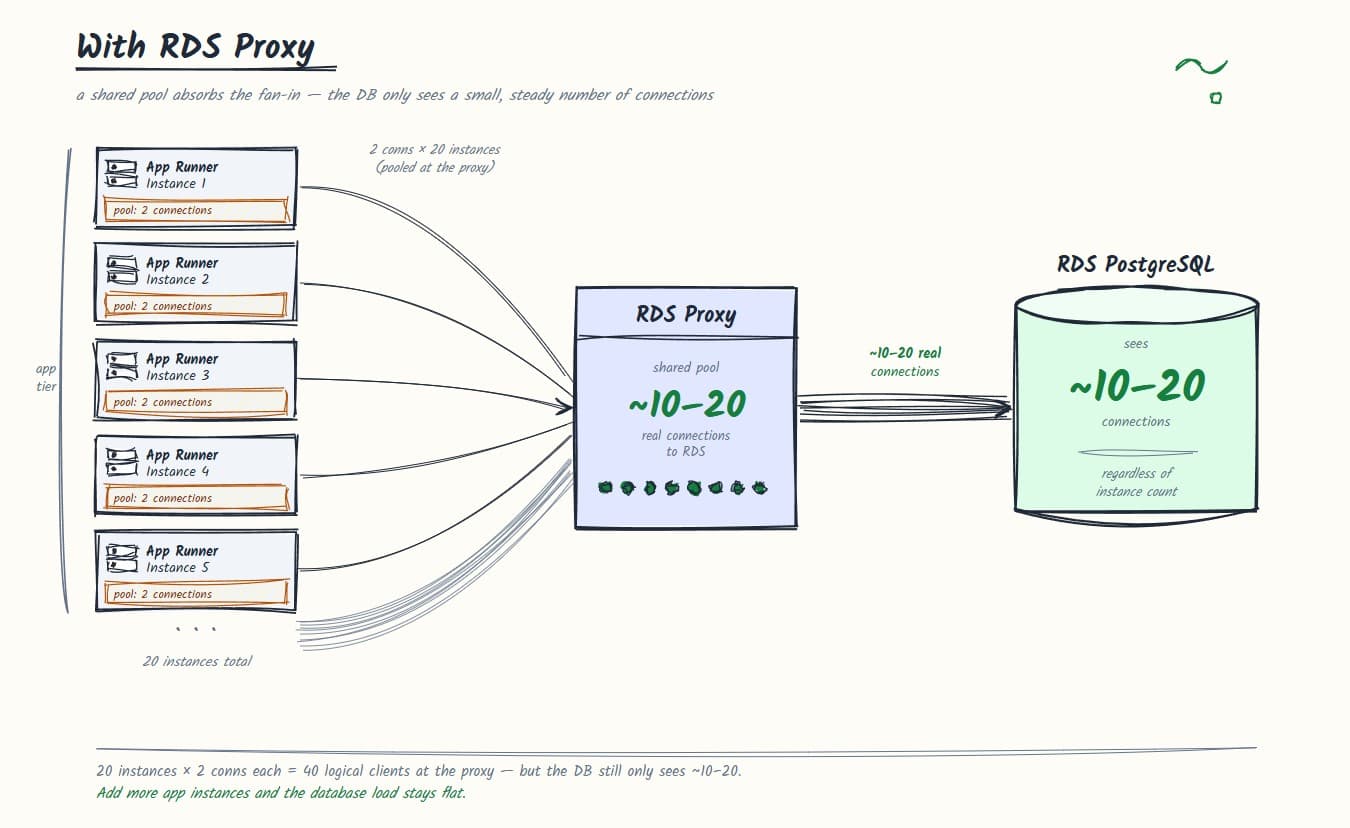
Provision the proxy in the same VPC as your RDS instance, point it at your database, and update your TypeORM data source config to use the proxy endpoint instead of the RDS endpoint.
// Before: connecting directly to RDS
const dataSource = new DataSource({
  type: "postgres",
  host: "your-rds-instance.xxxx.us-xxxx-x.rds.amazonaws.com",
  port: 5432,
  username: "your_user",
  password: "your_password",
  database: "your_db",
  poolSize: 10,
});
// After: connecting through RDS Proxy
// Note the pool size reduction — the proxy handles real pooling now
const dataSource = new DataSource({
type: "postgres",
host: "your-rds-proxy.proxy-xxxx.us-xxxx-x.rds.amazonaws.com",
port: 5432,
username: "your_user",
password: "your_password",
database: "your_db",
poolSize: 2,
});Notice the pool size change. With RDS Proxy handling real pooling at the infrastructure level, keeping a large per-instance pool is redundant. 1-2 connections per instance is enough. The proxy manages the actual connection lifecycle to RDS.
If your compute platform supports IAM-based service identity, enable IAM authentication on the proxy. It removes the credential management concern and fits cleanly into the AWS security model.
// With IAM authentication via Signer
import { Signer } from "@aws-sdk/rds-signer";
import { DataSource } from "typeorm";

const signer = new Signer({
  hostname: "your-rds-proxy.proxy-xxxx.us-xxxx-x.rds.amazonaws.com",
  port: 5432,
  region: "us-xxxx-x",
  username: "your_db_user",
});

const dataSource = new DataSource({
  type: "postgres",
  host: "your-rds-proxy.proxy-xxxx.us-xxxx-x.rds.amazonaws.com",
  port: 5432,
  username: "your_db_user",
  // Pass a function so the pool generates a fresh token on every new connection
  password: async () => await signer.getAuthToken(),
  database: "your_db",
  poolSize: 2,
  ssl: { rejectUnauthorized: false },
});
One Thing to Know About RDS Proxy and Prepared Statements
RDS Proxy operates in two modes: transaction pooling and session pooling. Transaction pooling is more efficient, but it doesn't support prepared statements in the standard sense. If your ORM or driver is using prepared statements, you may need to either disable them or switch to session pooling.
TypeORM with the pg driver uses prepared statements by default in some configurations. Check your specific setup before assuming transaction pooling works out of the box.
Note: The cleanest way to disable prepared statements with node-postgres is to use the
pgdriver'sprepare: falseoption if your version supports it, or use thepg-nativedriver which doesn't use them by default. Verify against your specificpgand TypeORM versions before applying this.
What We Should Have Done Earlier
The connection model should have been part of the initial infrastructure design, not a fix under load.
If your compute scales horizontally and each instance manages its own connection pool, you need centralized connection pooling before you hit production. Instance count times pool size equals connections hitting your database. At any meaningful scale, that number will exceed what RDS can handle without mitigation.
RDS Proxy adds latency in the single-digit milliseconds range. For most applications, that's not measurable in practice. It costs money, but the pricing is predictable, and it takes a whole class of nasty production incidents off the table.
If you're on AWS and running any horizontally scaling compute against RDS, the default assumption should be that RDS Proxy belongs in your stack.